SgtBot
Last Updated: March 23, 2026
Introduction
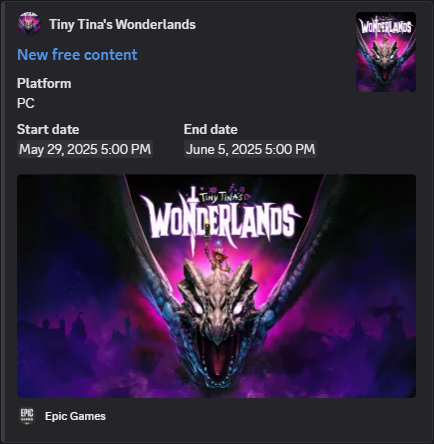
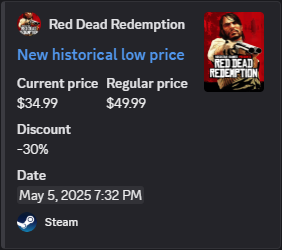
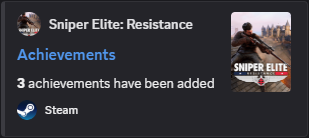
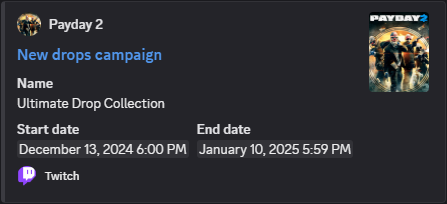
Sgt. Bot is a Discord application that periodically sends event messages about video games.
For example, it can inform you:
- About free promotions for games on multiple platforms (Steam, Epic Games, GOG, Amazon Luna)
- When a game from your wishlist reaches a historic low price on Steam
- When any of your games got some add-ons or achievements added/removed on Steam
- When a new drops campaign on Twitch or a new quest on Discord is available
…and more!
It can be fully customized using commands to only receive messages about desired events, games and players.
Some examples of messages:
Getting Started
- First, you need to add Sgt. Bot to your Discord server. You can invite him by clicking here.
- Then to start receiving event messages, you have to subscribe to a channel. This can be done using the following
command in the desired channel:
/channel-subscribe
That is all! Next time Sgt. Bot will send event messages, you will receive default ones in that channel.
If you want to better configure Sgt. Bot, you can see some examples below.
If you have an issue, please check the troubleshooting section of this page or join our support server.
Events
Here is a list of all available events that can be enabled/disabled per subscribed channel:
| Name | Description | Enabled by Default | Related Games |
|---|---|---|---|
ApplicationAnnouncements |
Send messages about new announcements from Sgt. Bot. | Yes | None |
SteamAnnouncements |
Send messages about new announcements from Steam Blog, Steam Store, SteamVR and Steam Deck on Steam. | No | None |
SteamGamesFreePromotions |
Send messages about games being temporary free to keep forever on Steam. | Yes | Any |
SteamGamesHistoricalLowPrices |
Send messages about games having new historical low prices on Steam. | Yes | Only Steam games wanted by registered players |
SteamGamesAnnouncements |
Send messages about games having new announcements on Steam. | No | Only Steam games owned and wanted by registered players |
SteamGamesAddOns |
Send messages about games having added or removed add-ons on Steam. | Yes | Only Steam games owned and wanted by registered players |
SteamGamesAchievements |
Send messages about games having added or removed achievements on Steam. | Yes | Only Steam games owned and wanted by registered players |
SteamPlayersGamesCompletions |
Send messages about players having completed games by earning all their achievements on Steam. | Yes | Only Steam games owned by registered players |
EpicGamesGamesFreePromotions |
Send messages about games being temporary free to keep forever on Epic Games. | Yes | Any |
GogGamesFreePromotions |
Send messages about games being temporary free to keep forever on GOG. | Yes | Any |
AmazonLunaGamesFreePromotions |
Send messages about games being temporary free to keep forever on Amazon Luna. | No | Any |
TwitchDropsAndRewardsCampaigns |
Send messages about new drops and rewards campaigns on Twitch. | Yes | Any/None |
DiscordQuests |
Send messages about new quests on Discord. | Yes | Any/None |
Games
Some events are associated with a game, for these you can include/exclude games in a subscribed channel. By default, every game is included.
When a specific game is included/excluded, most of the time this applies for every source (e.g. Steam, Twitch…). However, sometimes Sgt. Bot is not able to unify the same game across multiple sources. In that case, when including/excluding the game, it may appear multiple times and eventually with the source in parentheses.
Example:
Payday 2(every source but Twitch)PAYDAY 2 (Twitch): (only the Twitch source)
Players
A player is a Discord member of your server.
Some events are based on players such as SteamPlayersGamesCompletions, or on their games such as
SteamGamesAnnouncements. In order for them to work on your server, you need to register at least one player. Steam
events require players to have their Steam identifier registered.
More information about how to get a Steam identifier can be found here.
Note that this may require the Steam profile privacy to be stated as public, see here.
Commands
When you invite Sgt. Bot, it creates those commands on your server:
| Name | Description | Parameters | Scope | Default Permission |
|---|---|---|---|---|
/channels |
Display subscribed channels. | Server | Member | |
/channel-subscribe |
Subscribe the current channel. | Channel | Administrator | |
/channel-unsubscribe |
Unsubscribe the current channel. | Channel | Administrator | |
/channel-events |
Display enabled or disabled events in the current channel. | Channel | Member | |
/channel-event-enable |
Enable an event (or all events) in the current channel. | event |
Channel | Administrator |
/channel-event-disable |
Disable an event (or all events) in the current channel. | event |
Channel | Administrator |
/channel-games |
Display included or excluded games in the current channel. | Channel | Member | |
/channel-game-include |
Include a game (or all games) in the current channel. | game |
Channel | Administrator |
/channel-game-exclude |
Exclude a game (or all games) in the current channel. | game |
Channel | Administrator |
/players |
Display registered players. | Server | Member | |
/player-register |
Register a player. | player, (steam-id) |
Server | Administrator |
/player-unregister |
Unregister a player. | player |
Server | Administrator |
Examples
How to configure Sgt. Bot to only receive messages about historical low prices for games I want on Steam?
- First, subscribe to the channel where you want to receive event messages:
/channel-subscribe
- Suppose your Discord user is
Gabe Newell#1234and your Steam identifier is76561197960287930, then register you as a player so that Sgt. Bot will be able to track games you want:/player-register player:@Gabe Newell#1234 steam-id:76561197960287930
- Because you do not want to receive messages about every event, disable them all before enabling only the event you are
interested in:
/channel-event-disable event:(all)/channel-event-enable event:SteamGamesHistoricalLowPrices
Done! You will now save some money by only buying Steam games at the best prices!
How to configure Sgt. Bot to only receive messages about drops for the PAYDAY 2 game on Twitch?
- First, subscribe to the channel where you want to receive event messages:
/channel-subscribe
- To include only the PAYDAY 2 game, you need to exclude them all and then include only the desired game:
/channel-game-exclude game:(all)/channel-game-include game:Payday 2
- Because you do not want to receive messages about every event, disable them all before enabling only the event you are
interested in:
/channel-event-disable event:(all)/channel-event-enable event:TwitchDropsAndRewardsCampaigns
Done, you will not forget anymore to watch Twitch streams to get some cool masks to flex with in your favorite game!
Troubleshooting
I have subscribed a channel to Sgt. Bot, but I do not receive any message
- Ensure that at least one event is enabled and that games are included correctly:
/channel-events/channel-games
- Check that Sgt. Bot has enough permissions, at least:
View ChannelSend Messages/Send Messages in ThreadsEmbed Links
After that, if you still do not receive any event message from Sgt. Bot, that may be because none has been sent since. Eventually, in that case, you will have to wait.
I have subscribed a channel to Sgt. Bot, but I receive messages about events I am not interested in
While subscribing a channel to Sgt. Bot, some events are enabled by default. Enabling new events does not disable default ones. To only receive messages from events you are interested in, you should first disable them all.
- This can be achieved with this command:
/channel-event-disable event:(all)
- Then, you have to enable events you want one by one, for example with both
TwitchDropsAndRewardsCampaignsandDiscordQuestsevents:/channel-event-enable event:TwitchDropsAndRewardsCampaigns/channel-event-enable event:DiscordQuests
- Finally, feel free to use the following command to check which events are enabled or not:
/channel-events
I am trying to include a game, but I cannot find it
-
First, ensure that keywords you are using are not partial words. This is what the internal search engine is expecting to work properly. For example, you will not find the
Payday 2game by using thepaykeyword, but rather usingpayday. -
You may still not find your game at this point. Sgt. Bot only know about games from past events and Steam owned/wanted ones from registered players. In that case, please reach us on the #game-requests channel of our support server.
Extra tip: If the missing game is a Steam game, you can add it to the Steam wishlist of a registered player, and then wait for Sgt. Bot to process event messages later.
I cannot find a Discord quest from a message sent by Sgt. Bot
Some Discord quests are not available to everyone, so you may not be eligible for this one.
Credits
- Sgt. Bot is powered by JDA
- Games are unified across several sources thanks to IGDB
- Steam historical low prices are provided by IsThereAnyDeal